
Autonomous AI growth
massive X engagement
Download & Verify Assistant
Enter your issued license key to verify X account quota and download your protected extension package.
tg-queue-chat live
Queue 3
Credits
Generated reply voice-aware
Voice builder
 Chrome
 Brave
Brave
 Edge
Edge
 Opera
Opera
 Arc
Arc
 Kiwi
Kiwi
 Mises
Mises
Transparent Pricing - 1 Key, Any Device
Get 50% off during our limited launch celebration.
1 Month Access
Ideal for testing & individual growth hackers
- 1 X account X-Account License Authorization
- Multi-Key Gemini Failover & Rotation
- 100-Tier Adaptive Rest Pool Active
- Instant Key Minting & Setup Guide
3 Months Access
Quarterly farming momentum & viral growth
- 1 X account X-Account License Authorization
- 90 Days Uninterrupted Autonomous Power
- Custom Prompt Presets & Niche Brain
- Priority Customer Onboarding
6 Months Access
Semi-annual dominant community & client pipeline
- 1 X account X-Account License Authorization
- 180 Days Continuous Edge Access
- All 53 Humanized Break Rests
- Dedicated Telegram Growth Channel
1 Year (12 Months)
Maximum powerhouse for agencies & multi-account teams
- 1 X account X-Account License Authorization
- 365 Days Unrestricted License
- Agency X-Account Floating & Rebind Rights
- Direct VIP Developer Telegram Access
ActionX Managed AI Credit Packs
Direct managed AI generation. Get 40–50% extra bonus comments vs competitors with our multi-model failover engine. Credits never expire.
Choose 7k, 15k, or 30k (+50% bonus comments).
Binance Pay (0 fee instant) or USDT Crypto.
Credits appear in your extension balance live.
Starter Pack
Ideal for casual accounts & testing
- ✓ 7,000 AI Comments included
- ✓ +2,000 extra bonus comments
- ✓ Credits never expire
- ✓ Instant auto-refund on failed tweets
Growth Pack
For serious daily growth hackers
- ✓ 15,000 AI Comments included
- ✓ +5,000 extra bonus comments ($0.66/1k)
- ✓ Multi-model failover (Gemini + DeepSeek)
- ✓ Instant auto-refund on failed tweets
Pro Agency
For heavy multi-account operations
- ✓ 30,000 AI Comments included
- ✓ +10,000 extra bonus comments
- ✓ Ultra-fast priority throughput
- ✓ Credits never expire
Custom Units
Type any USD amount ($1 = 1,000 comments)
- ✓ $1 per 1,000 comments (minimum $1)
- ✓ Flexible volume anytime
- ✓ Credits never expire
- ✓ Full refund guarantee on failed posts
Earn 10% instant commission on every referral
Share your link. Direct payouts to Binance Pay or your crypto wallet on every subscribe and renew.
From signal to engagement.
Five precise steps, repeated every session. The engine stays out of your way until it matters.
Signal enters the system.
Four multi-channel inputs: Home Feed walk, direct URL sniper links, targeted creator profiles, or curated X lists.
Deduped & budget-aware.
Every target is checked against engagement history. Already-liked, already-commented, and reply-tweets are filtered at intake.
Voice-aware generation.
Your tone, language mix, and niche persona shape every draft. Semantic gating rejects off-topic tweets before drafting starts.
Human-paced execution.
Minimum-jerk cursor paths, Fitts-law timing, and digraph typing rhythm. Adaptive pause breaks keep pacing authentic.
Full audit visibility.
Live monitor, session export, detailed action metrics, and forensic snapshots give you 100% clarity into every interaction.
Engineered with boundaries.
No growth guarantees. No password collection. No mass-posting. The engine manages a workflow you control.
Frequently asked.
No. The extension runs inside your browser and uses your existing logged-in X session. It never asks for, stores, or transmits your X credentials.
Chrome, Brave, Edge, Opera and Arc on desktop. On Android, Kiwi Browser and Lemur Browser load the mobile package directly. Any Chromium-based browser with extension support works. Stock Chrome on Android cannot load extensions at all.
That means the extension files were deleted - actionX itself is not broken. It happens when the extension was installed from an extracted .zip folder: Mises/Kiwi copy + (from .zip) installs into a temporary cache folder, and clearing the browser cache (or an OS cleaner) wipes those files - the popup then renders as a tiny broken image and the worker fails.
Fix (2 minutes): remove actionX from mises://extensions, then download the .crx file from this page (do not unzip it), open mises://extensions, turn ON Developer mode, tap + (from .zip/.crx/.user.js) and pick the .crx file. A .crx install is browser-managed and survives cache clears and reboots.
If the popup still looks broken after the reinstall, open it once and press Reload extension on the red card - the popup now tells you when the background worker did not answer instead of showing a blank box.
Android (Mises / Kiwi / Lemur): download the mobile .crx, open mises://extensions (or kiwi://extensions), turn ON Developer mode, tap + (from .zip/.crx/.user.js) and pick the .crx file - it installs a permanent browser-managed copy that survives cache-clear and restarts. Never extract it: unpacked-folder installs break when the folder moves or the cache is cleared.
Unpacked installs only reference your folder - the browser keeps no copy. Mises also extracts + (from .zip) installs into a cache folder, so clearing cache (or the OS cleaner) deletes the extension files: popup shows ERR_FILE_NOT_FOUND and the service worker fails with Status code: 10. Fix: download the mobile .crx from this site, open mises://extensions, tap + (from .zip/.crx/.user.js), pick the .crx - this installs a permanent browser-managed copy that survives cache-clear and restarts. Re-activate with your license key afterwards (a reinstall may use one device slot - contact support if you hit the limit).
Every interaction is timed with real models: minimum-jerk cursor motion, Fitts-law targeting, physiological tremor, and QWERTY digraph typing rhythm. Adaptive breaks, a sleep window and rate-brakes are layered on top.
No. Reply-tweets are detected from X's own conversation data and skipped, so the engine only engages root posts. You stay on the main conversation, never on a commenter's reply.
Yes. A license key activates up to your plan's account capacity. Devices are tracked per key, and you can manage or reset slots from the client dashboard.
Session activity stays on your device. The license server only records key activation and quota counters. We do not sell personal data and we do not collect passwords.
My Active Subscriptions & X Accounts
Monitor your active license keys and bound X accounts.
Active X-Account Licenses (0)
| License Key | Plan & Status | X Accounts | Download |
|---|---|---|---|
| Please sign in to view your subscriptions. | |||
My Orders & Payment Verification (0)
Real-time status of your license activations| Order & Status | Plan & Payment | License Key |
|---|---|---|
| Please sign in to view your orders. | ||
Engineered For Elite Growth
Every line of code is structured to mirror authentic human behavioral patterns and avoid platform bot flags.
Adaptive Rest Engine
Calculates dynamic pauses in real-time. Automatically scales from 40s quick micro-rests to 12-min deep cool-downs based on queue load.
Rolling Brain Memory
Retains the last 10 replies across sessions. Analyzes syntax and strictly bans repetitive openers, meta-phrasing, and spam slang.
Multi-API Failover
Connects to Gemini (1,500 free req/day), OpenAI, Claude & DeepSeek. Smooth multi-key pool rotation ensures zero dropped actions.
Image & Article Synthesis
Extracts visual context from charts, screenshots, and long articles. The AI reads imagery and text together to craft razor-sharp takes.
Floating Account DRM
Cryptographically signed sessions supporting 1, 3, or 5 X profiles simultaneously across devices without credential sharing.
Bezier Mouse & Digraph Typing
Simulates human finger cadence with micro-pauses, typo self-corrections, and cursor tremor so bot detection engines stay blind.
Your Referral Activity Ledger (0)
Real-time Cloudflare KV ledger attribution| User / Masked Email | Joined Date | Status | Subscribed Plan | 10% Commission Earned |
|---|---|---|---|---|
| Please sign in with your Google account to view your referral ledger. | ||||
How actionX Works (Step-by-Step)
An interactive, step-by-step visual tutorial designed so anyone can configure and deploy high-converting AI automations in minutes.
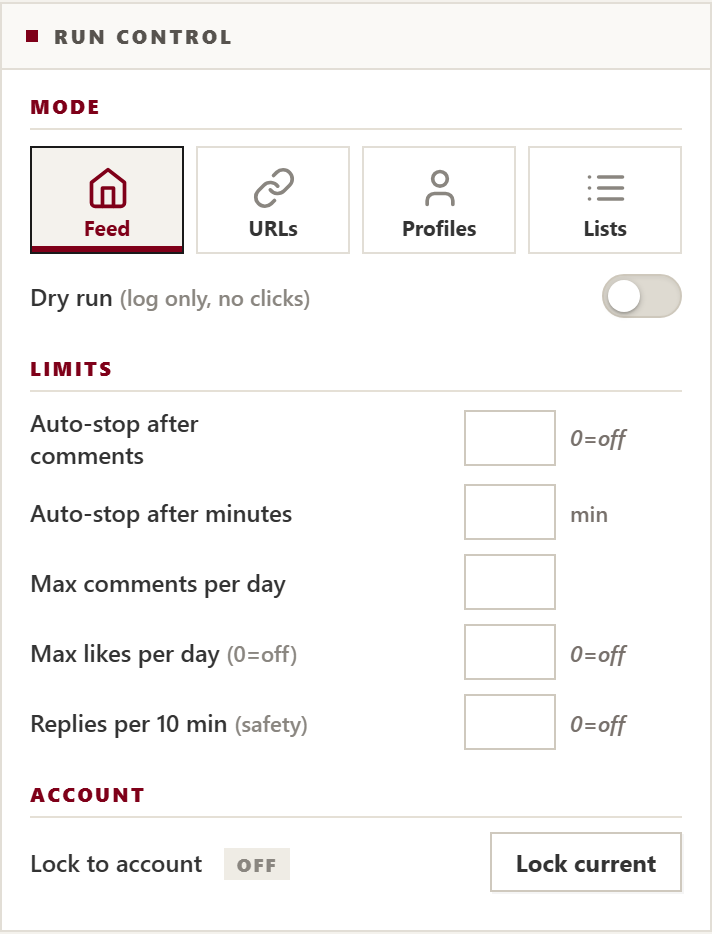
Choose Your Operating Mode & Action Switches
actionX offers four dedicated operating modes. You control every single switch: like, intelligent comment, repost, and author follow.
- Feed Walk: Browses Home timeline naturally, reading fresh posts and building real community connections.
- URL Sniper: Paste viral tweet links to laser-target discussions with thousands of viewers.
- Profiles & Lists: Engages specific target creator handles or curated X Lists with zero algorithmic noise.

Stack 5-6 Free Gemini Keys for Zero-Cost Unlimited Replies
Stop paying expensive monthly API bills. Google provides 1,500 free requests per day per Gemini API key. Add 5 keys to unlock 7,500 free comments every day.
- Rotation Mode: actionX cycles through Key #1, #2, #3 for each comment, letting keys rest so you never hit rate limits.
- Auto-Switch Failover: If any single key hits quota, the engine instantly shifts to the next key without dropping a single tweet.
- Recommended Model: Choose
gemini-3.5-flash-litefor sub-second responses and rock-solid free quota stability.
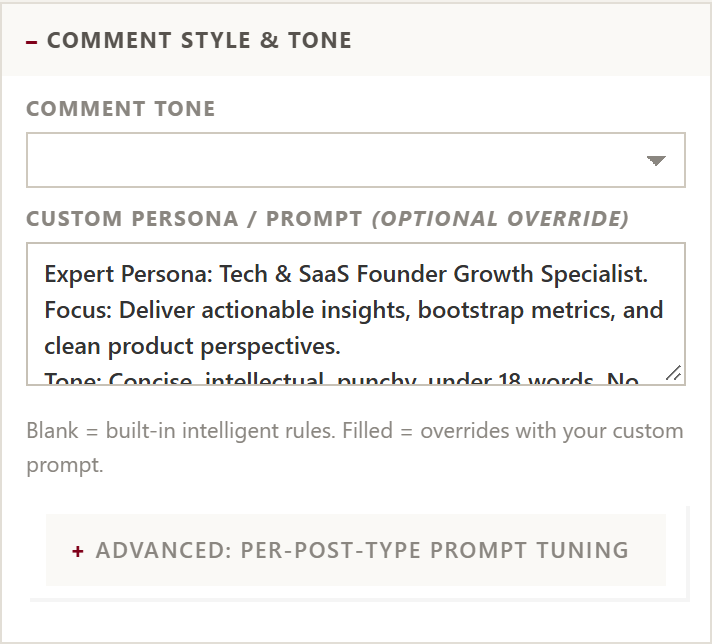
Set Your Industry Persona & Smart Blacklist Filters
Make your comments sound like an authentic domain expert. actionX reads post text, images, and author context to craft authentic high-converting replies.
- Crypto & Web3: Analyze on-chain metrics, layer-2 narratives, and DeFi sentiment with punchy technical takes.
- Tech & Founders: Deliver actionable engineering insights, architecture tips, and constructive dev feedback.
- Anti-Spam Filter: Built-in blacklist automatically ignores posts with spam keywords (
dm me, telegram, pump, scam).
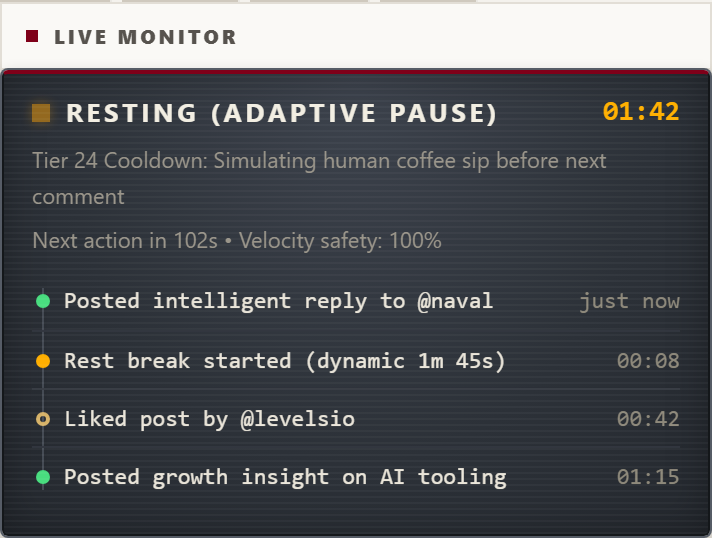
Bezier Mouse Motion & 100-Tier Adaptive Rest Engine
Platform algorithms look for robotic rhythm, steady speeds, and artificial click bursts. actionX eliminates bot flags by mirroring authentic human biology.
- 100-Tier Rest Engine: Pauses automatically scale from 40s coffee sips up to deep 12m cooldowns for large campaigns.
- Typo Simulation: Occasionally makes realistic keystroke errors and self-corrects them with backspaces (
isTrusted=true). - Live Monitor: Inspect active rest states, countdown timers, and full timestamped interaction history live.
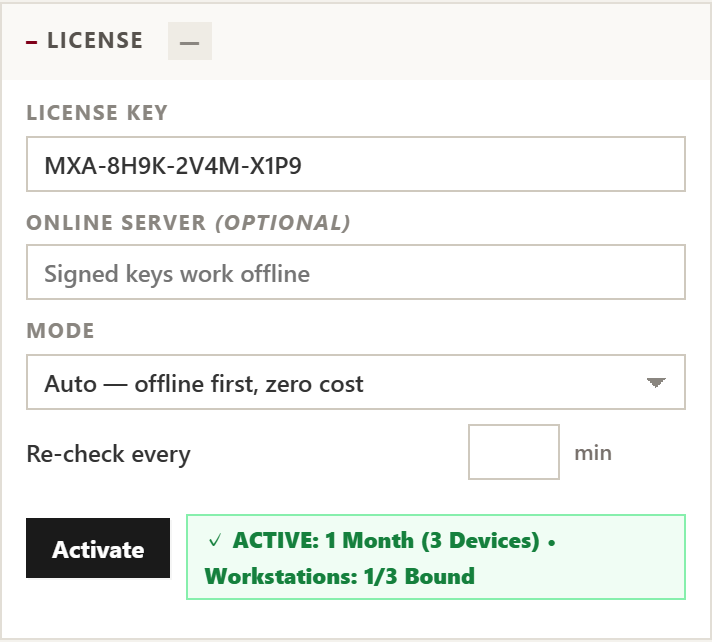
Paste License Key & Hit START
After completing checkout on this website, you receive your instant X-account license key. Simply paste your key and click Activate.
- Displays verified subscription duration and your bound X handle (e.g. @yourhandle).
- Click the prominent black START button to begin autonomous engagement.
- Use hotkeys
Ctrl+Shift+Sto emergency stop orCtrl+Shift+Pto pause at any time.
How to Install actionX on Your Computer (Step-by-Step)
An interactive guide with direct computer screenshots to load actionX in Google Chrome, Brave, or Microsoft Edge in under 60 seconds.
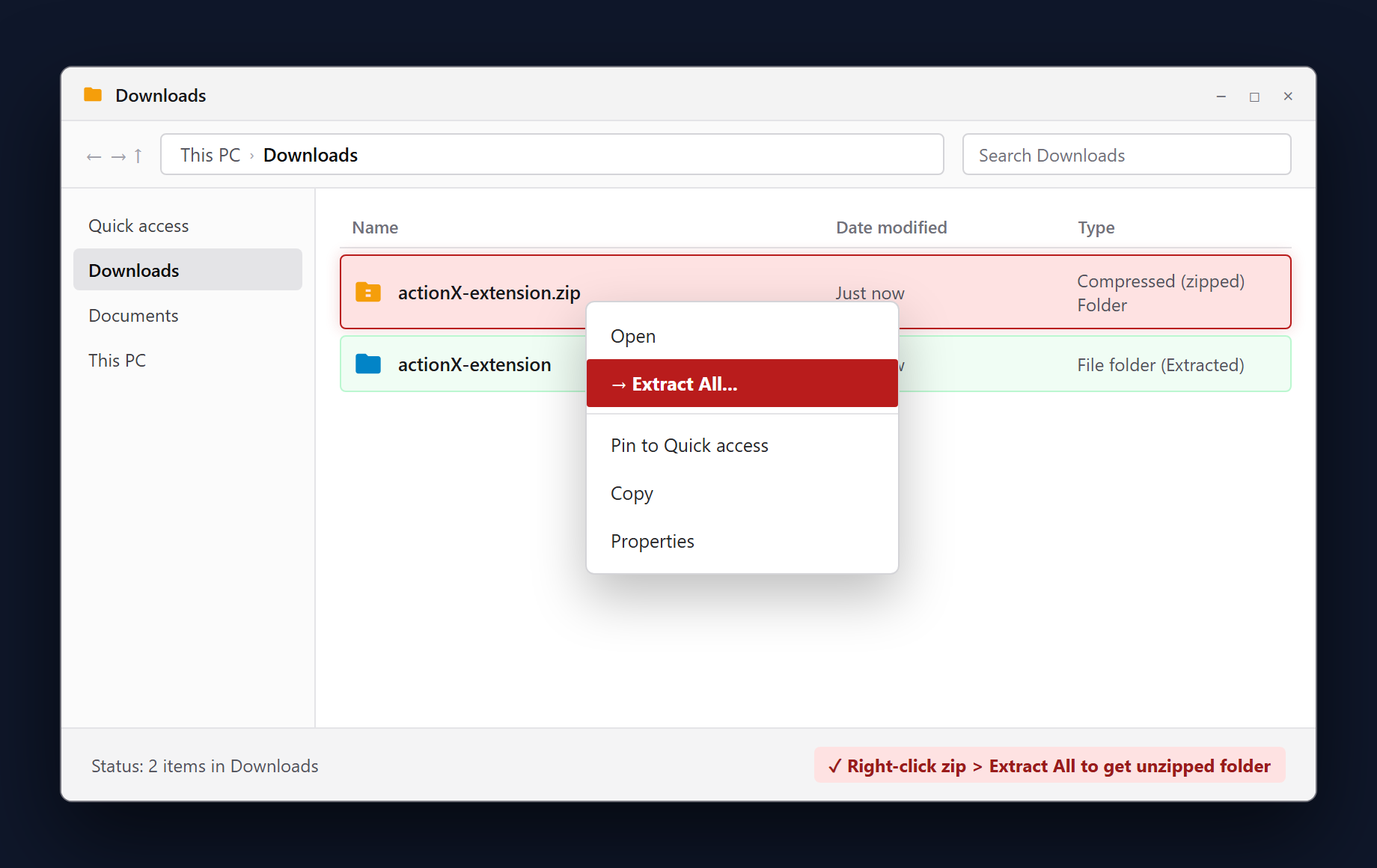
Download & Extract the Zip Package
After downloading actionx-v3.1.9.zip, open your Downloads folder in File Explorer. Right-click the archive and select Extract All... to produce the unzipped extension directory.
- Right-click
actionx-v3.1.9.zip→ Extract All... - Verify the output folder contains
manifest.json.
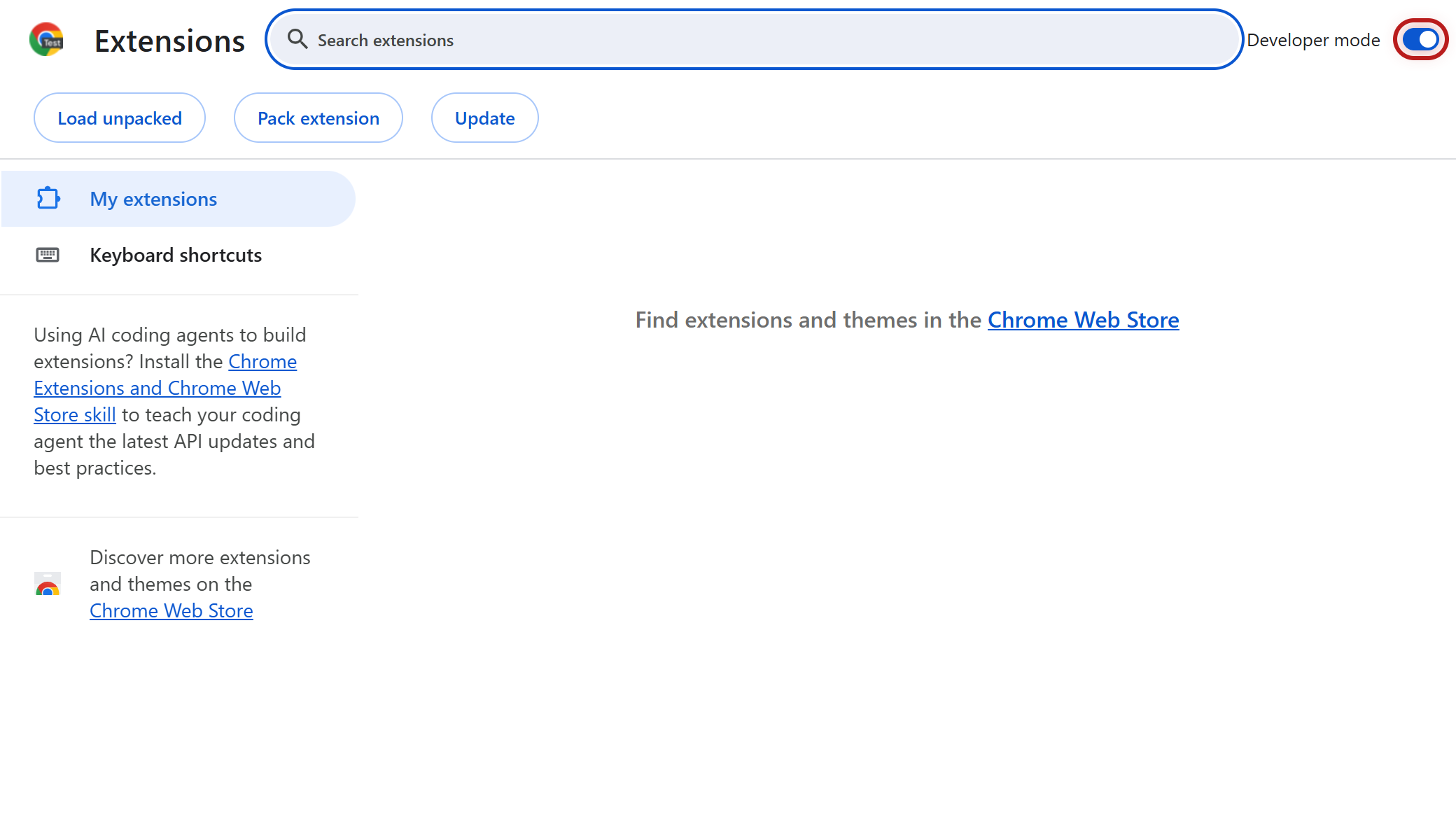
Open chrome://extensions & Turn ON Developer Mode
In Chrome, Brave, or Edge, type chrome://extensions in the URL bar and press Enter. Locate the Developer mode toggle in the top-right corner and turn it ON.
- Navigate to
chrome://extensionsin your browser. - Toggle Developer Mode in the top-right toolbar.
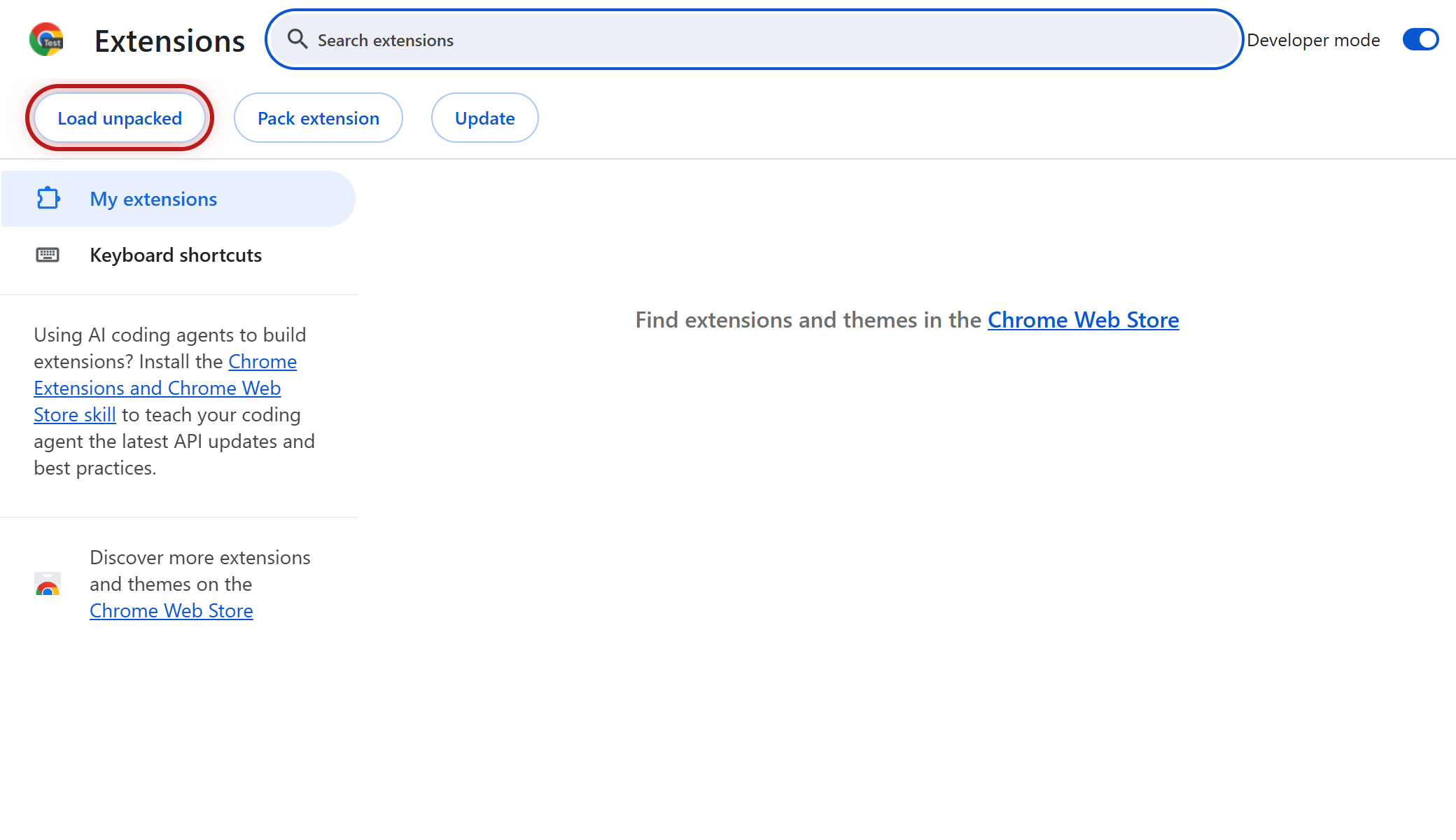
Click the "Load unpacked" Button
Once Developer mode is enabled, Chrome displays three buttons in the top-left toolbar. Click Load unpacked to trigger the system folder picker.
- Find the top-left toolbar on the extensions page.
- Click the Load unpacked button.
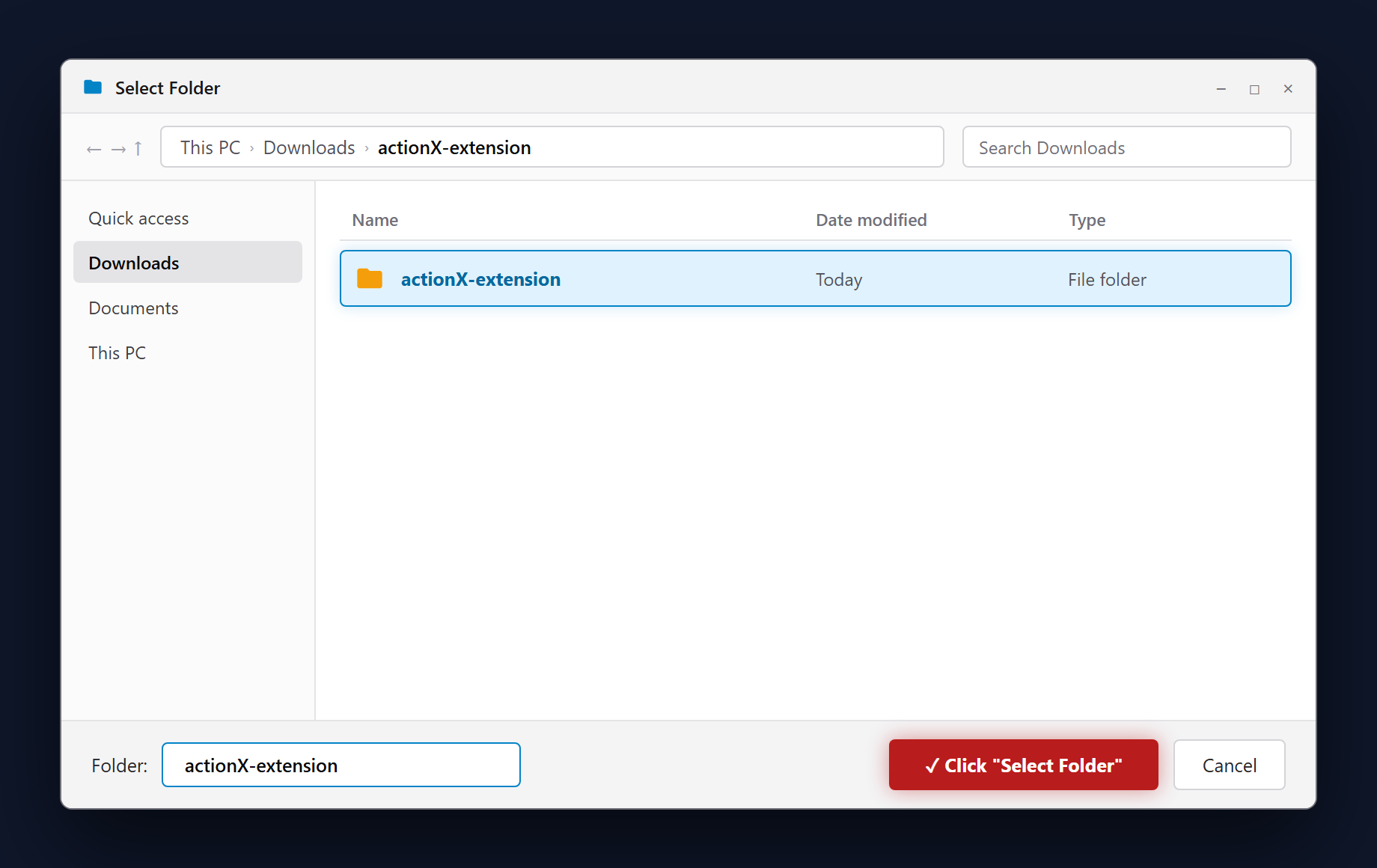
Select the "actionX-extension" Folder
In the file browser, navigate to your extracted folder (the directory containing manifest.json), select it, and click Select Folder at the bottom right.
- Select the folder containing
manifest.json. - Click Select Folder to confirm.
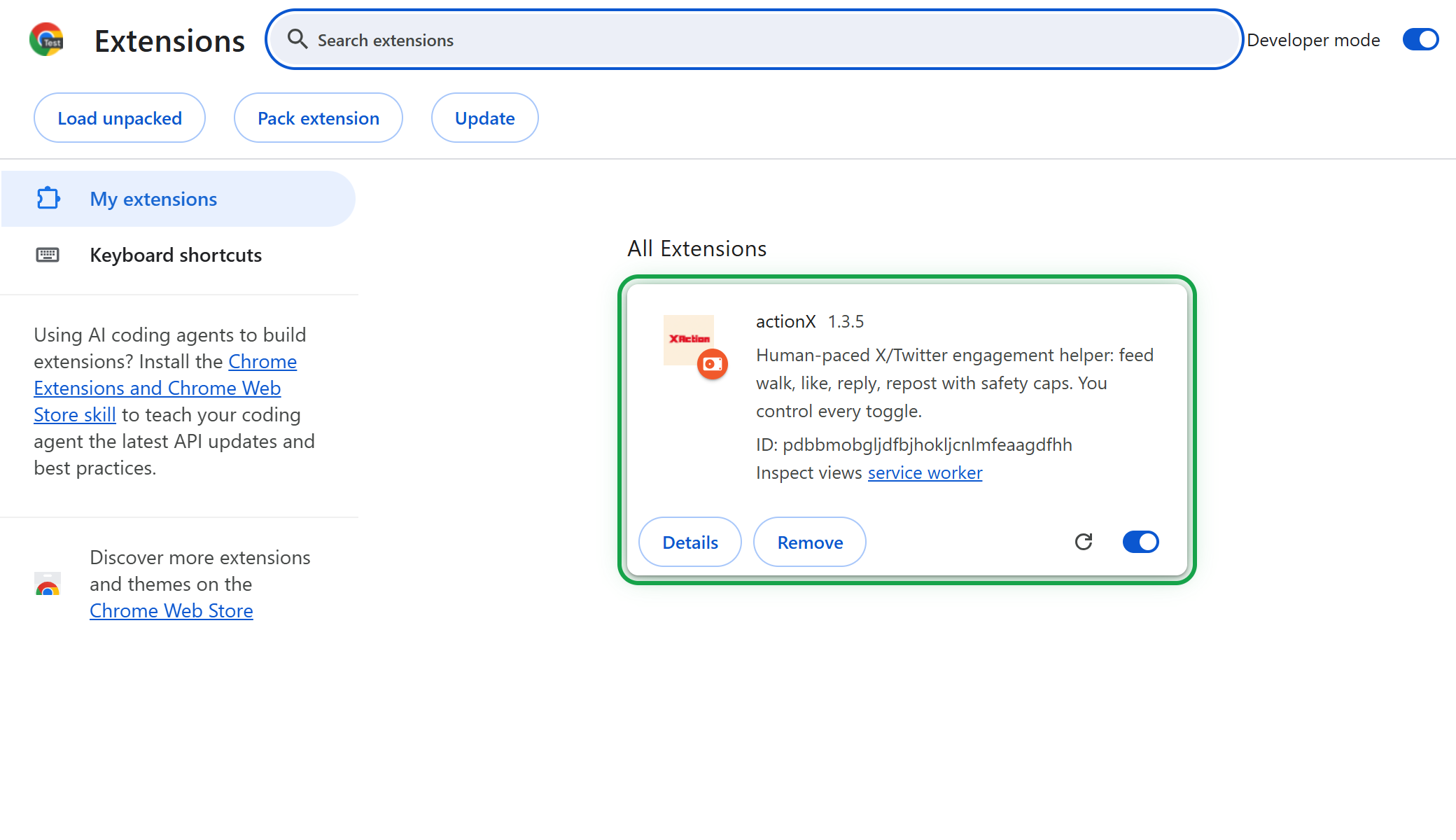
Verify Extension Card is Active
The actionX v3.1.9 card now appears in your Chrome extensions list. Check that the toggle in the bottom right of the card is switched ON.
- Card confirms actionX v3.1.9 is registered.
- No browser restart required — service worker is alive.
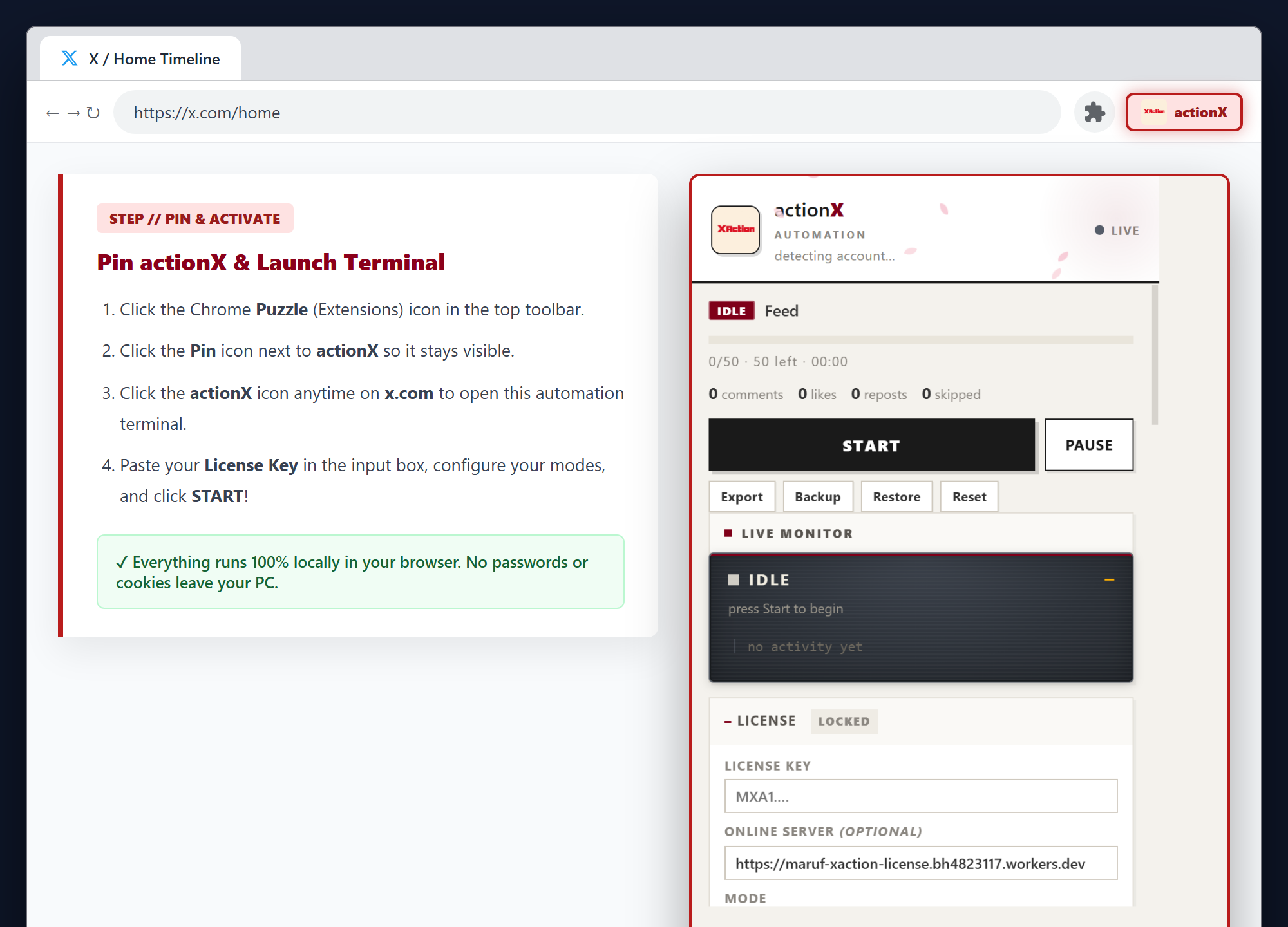
Pin actionX to Toolbar, Paste Key & Hit START
Click Chrome's Puzzle icon and pin actionX. On x.com, open actionX, paste your License Key, configure your niche persona, and click START!
- Pin actionX to Chrome toolbar for 1-click access.
- Paste your license key to unlock your X account quota.
- 100% Client-Side: Zero cloud credentials stored.

 BNB
BNB POL
POL ARB
ARB ETH
ETH USDT
USDT USDC
USDC